Driving License Print Check 2026
Verify Printed License Instantly · ड्राइभिङ लाइसेन्स प्रिन्ट चेक
Instantly check whether your Nepal DOTM smart card has been printed. Search 1.3M+ records — free, no login required.
XX-XX-XXXXXXXX — e.g. 01-02-12345678
Send LC 01-02-12345678 to 34949 or 33001 — works on NTC, Ncell, Smart Cell.
What is License Print Check Nepal?
License Print Check Nepal allows applicants to verify whether their DOTM smart driving license has been printed and dispatched. Use this print license checker to instantly find out if your driving license printed or not — just enter your license number to verify against the Transport Management Nepal database. Check your status on licenceprintcheck.org, or through the official dotm.gov.np license check portal, via SMS, Nagarik App, or by visiting your local Transport Management Office. (ड्राइभिङ लाइसेन्स प्रिन्ट चेक · लाइसेन्स स्थिति जाँच)
📑Table of Contents
18 sections
▼
- Quick Status Checker
- How to Check in 4 Steps
- What is License Print Check?
- Understanding Status Results
- 4 Ways to Check Your License
- License Categories Guide
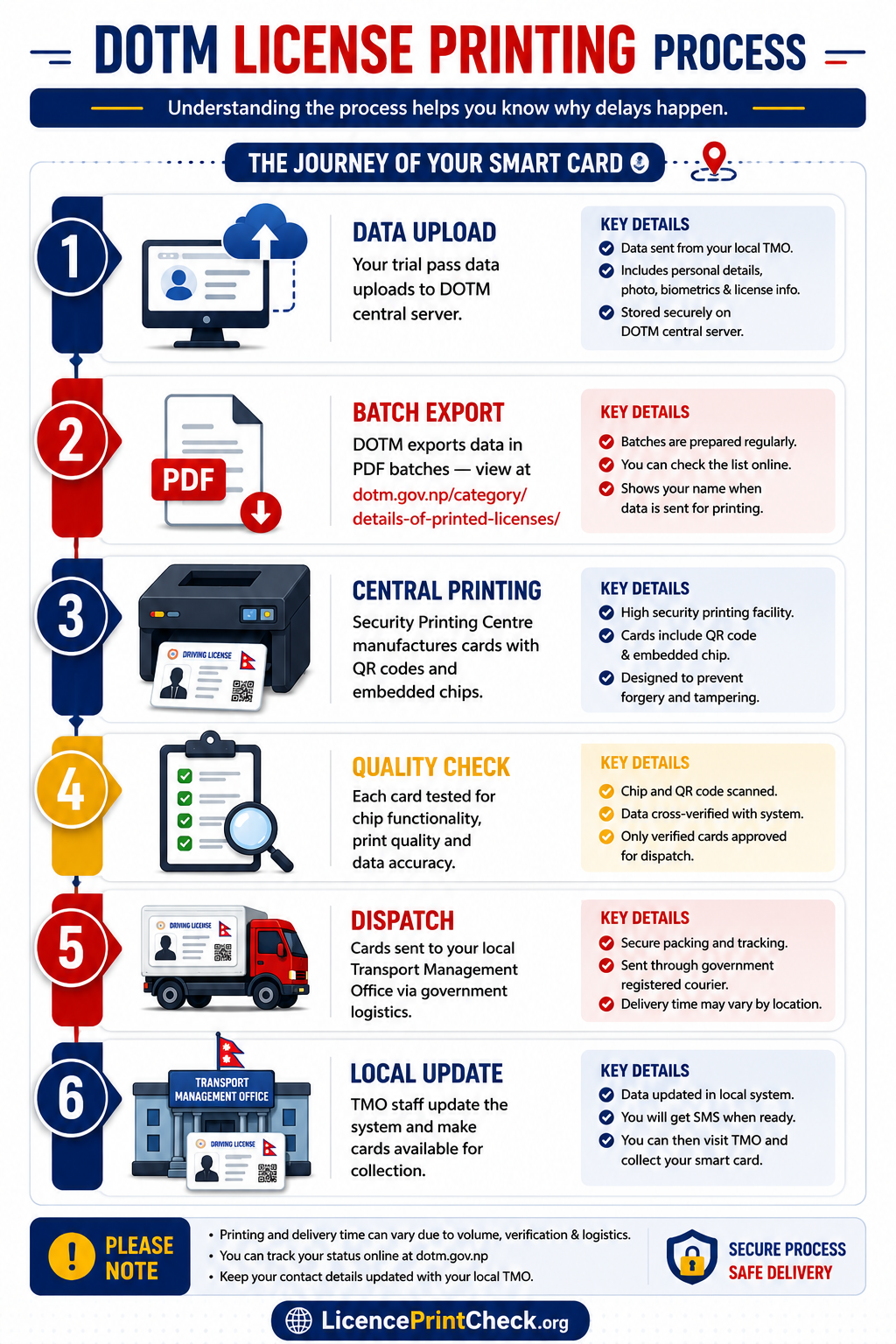
- How DOTM Printing Actually Works
- Processing Time by Office
- All 20 Transport Offices in Nepal
- What If Not Printed After 3 Months?
- How to Collect Your Smart Card
- Can Someone Else Collect?
- Is Old Paper License Still Valid?
- Legal Framework: Know Your Rights
- Method Comparison: Which is Best?
- Common Issues & Fixes
- FAQs
- Related Guides
How to Check License Print Status in 4 Steps
The fastest online path. Takes under a minute — you only need your license number.
Enter License Number
Type your license number in format XX-XX-XXXXXXXX
Click “Check Now”
Wait 3–5 seconds while the system searches DOTM records
Read Your Result
Match it against the status legend below to know your next step
What is License Print Check in Nepal?
After passing your written exam (Likhit) and trial exam — see our full guide on how to apply for a driving license in Nepal online — the Department of Transport Management (DOTM) — operating under Nepal’s Ministry of Physical Infrastructure and Transport — sends your data to the Central Printing Facility (Security Printing Centre) for smart card manufacturing.
License Print Check is the process of verifying whether your smart card (with embedded QR code) has been:
- ✅ Printed at the central facility
- ✅ Dispatched to your local office
- ✅ Ready for collection at the counter
When you verify your driving license printed or not using our tool, you’ll instantly see key details including the license holder name Nepal record shows, the transport office it belongs to, print date, and vehicle category — all pulled from official DOTM print batch data.
Understanding Status Results
Every result means something specific — here’s what to do in each case.
4 Ways to Check Your License
Pick the one that fits your situation.
Online via DOTM Portal
The official dotm.gov.np license check service — direct from the government source.
- Go to dotm.gov.np
- Navigate to “License Print Check”
- Enter your number:
XX-XX-XXXXXXXX - View result with batch details
SMS Check
Send LC 01-02-12345678 to any of:
- Works on NTC, Ncell, Smart Cell
- Cost: Rs. 5 + tax per SMS (see full driving license fee Nepal guide)
- Reply in 1–2 minutes
Nagarik App (v2.0.95+)
- Download Nagarik App from Play Store or App Store
- Login with MPIN or biometric
- Go to Transport Services → License Status
- Enter your license number
New: real-time queue position, push notifications, direct complaint filing.
Offline at Yatayat Karyalaya
Use when:
- Online shows “Not Found” for 2+ months
- You need to file a complaint
- You want to collect your card
Bring: Citizenship + Application Receipt + Token Slip
License Categories Guide
All 12 categories DOTM issues, from motorcycle to trolleybus.
How DOTM License Printing Actually Works
Understanding the process helps you know why delays happen.
The Journey of Your Smart Card 🗺️
Your trial pass data uploads to DOTM central server.
DOTM exports data in PDF batches — view at dotm.gov.np/category/details-of-printed-licenses/
Security Printing Centre manufactures cards with QR codes and embedded chips.
Each card tested for chip functionality.
Cards sent to your local Transport Management Office via government logistics.
TMO staff update the system and make cards available.
Processing Time by Transport Office
Based on our monitoring of DOTM updates and user reports.
| Office Type | Average Wait | Why? |
|---|---|---|
| Kathmandu Valley Chabahil, Ekantakuna | 2–3 weeks | High volume, efficient processing |
| Major Provincial Pokhara, Biratnagar, Butwal | 3–4 weeks | Moderate volume |
| Smaller District Offices | 4–6 weeks | Less frequent dispatch |
| Backlog Areas | 6+ weeks | Post-COVID delay, staff shortage |
All 20 Transport Offices in Nepal
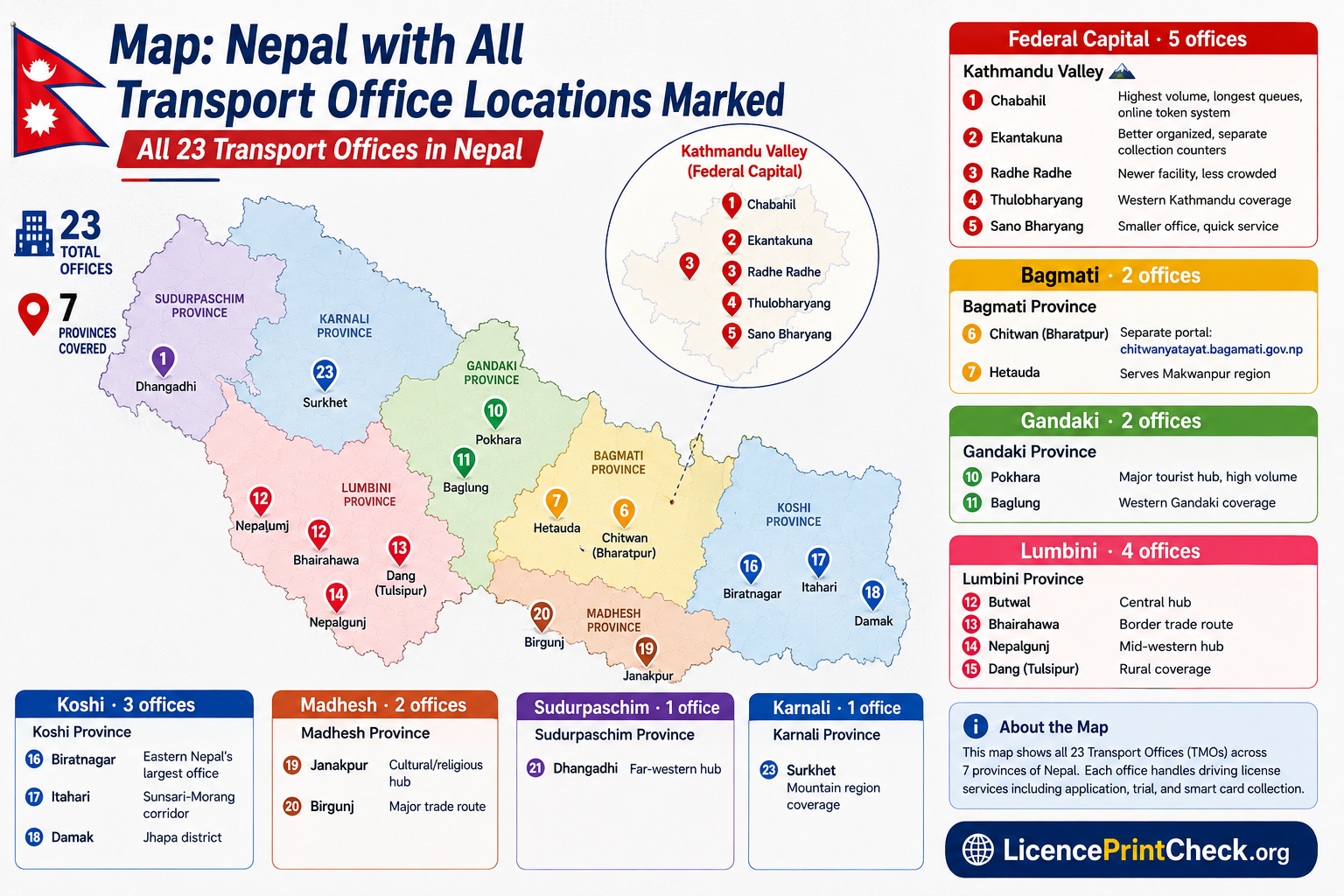
Complete Nepal-wide directory, grouped by province.
🏛️ Kathmandu Valley
- 📍ChabahilHighest volume, longest queues, online token system
- 📍EkantakunaBetter organized, separate collection counters
- 📍Radhe RadheNewer facility, less crowded
- 📍ThulobharyangWestern Kathmandu coverage
- 📍Sano BharyangSmaller office, quick service
🌆 Bagmati Province
- 📍Chitwan (Bharatpur)Separate portal: chitwanyatayat.bagamati.gov.np
- 📍HetaudaServes Makwanpur region
⛰️ Gandaki Province
- 📍PokharaMajor tourist hub, high volume
- 📍BaglungWestern Gandaki coverage
🕉️ Lumbini Province
- 📍ButwalCentral hub
- 📍BhairahawaBorder trade route
- 📍NepalgunjMid-western hub
- 📍Dang (Tulsipur)Rural coverage
🌊 Koshi Province
- 📍BiratnagarEastern Nepal’s largest office
- 📍ItahariSunsari-Morang corridor
- 📍DamakJhapa district
🌾 Madhesh Province
- 📍JanakpurCultural/religious hub
- 📍BirgunjMajor trade route
🌅 Sudurpaschim Province
- 📍DhangadhiFar-western hub
🗻 Karnali Province
- 📍SurkhetMountain region coverage
What If Not Printed After 3 Months?
This is the #1 pain point. Here’s your action plan.
Step 1: Verify Your Application
- Check applydlnew.dotm.gov.np — did you pass both written and trial exam?
- Confirm your biometric verification was completed.
Step 2: Identify the Problem
| Symptom | Likely Cause | Solution |
|---|---|---|
| “Not Found” for 2+ months | Data not uploaded | Visit TMO with trial receipt |
| “Pending” for 4+ weeks | Batch delay | Wait 1 week, then complain |
| “Rejected” | Photo / biometric mismatch | Re-apply with correct docs |
| Status blank | System glitch | Try SMS or visit office |
Step 3: File a Complaint
Under the Right to Service Act, you can:
- Submit a written complaint at your TMO
- Email DOTM through the official portal
- Use the Nagarik App complaint feature
Step 4: Emergency License
For urgent needs — medical, job, family emergency — visit your TMO with supporting documents. They may issue a temporary permit valid until the smart card arrives.
How to Collect Your Printed Smart Card
Documents You MUST Bring
For the complete list of documents needed for every license process, see our detailed documents required for driving license Nepal guide.
- Citizenship Certificate — Original + 1 photocopy
- Application Receipt / Payment Slip — Proof of fee payment
- Token Slip — Given at trial time
- Trial Pass Receipt — Confirms you passed
- Old Paper License — If renewal, surrender old license
- Photo ID — Backup in case of name mismatch
Collection Steps
Don’t waste a trip — confirm status is “Printed” or “Dispatched”.
Usually 10 AM – 3 PM.
Hand over your citizenship, receipt, and token.
Fingerprint match required before card handover.
Test the QR code on the card before leaving the counter.
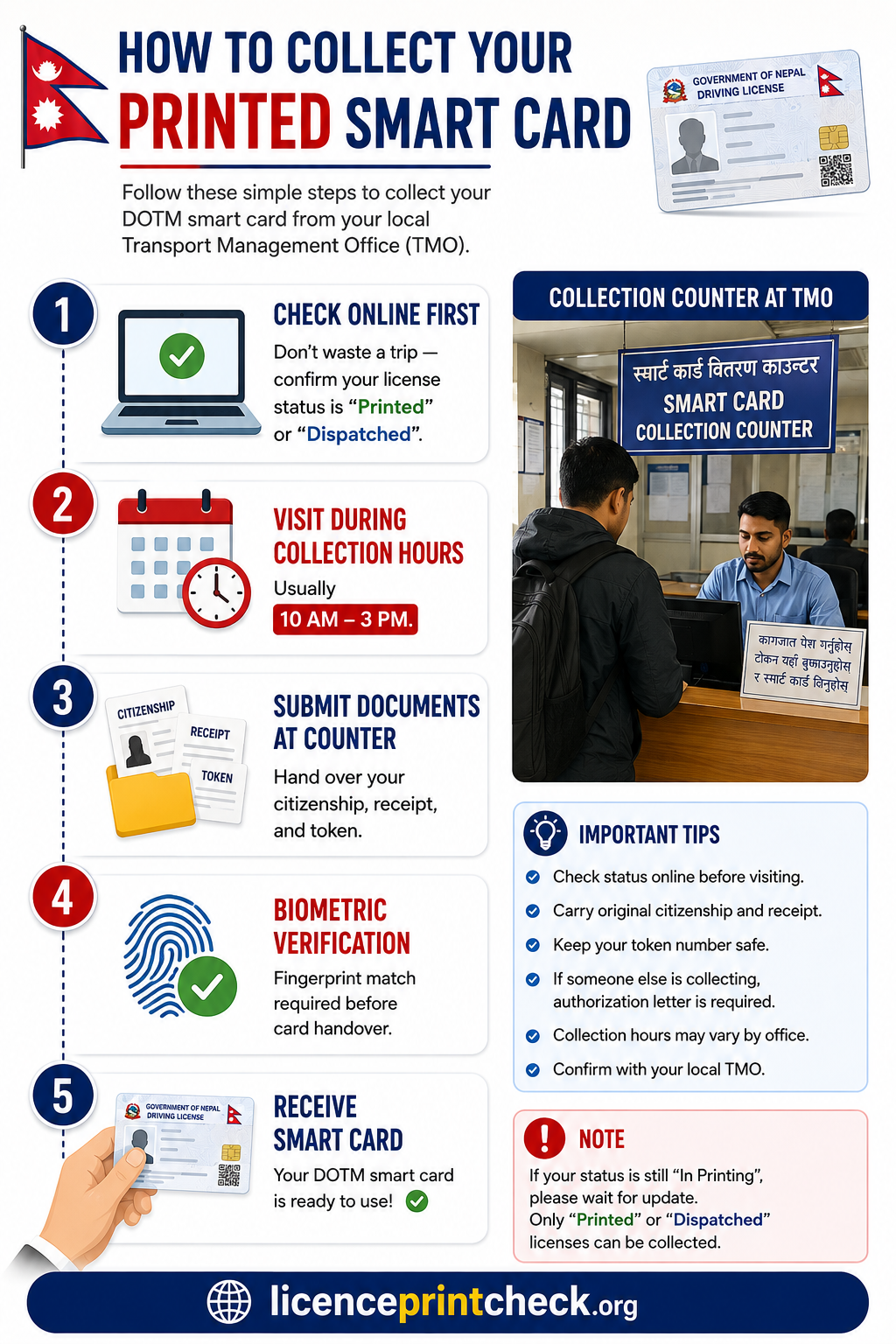
Can Someone Else Collect on Your Behalf?
Yes — but with these requirements:
- Your original Citizenship Certificate
- Authorization letter signed by you
- Their Citizenship Certificate
- Relationship proof (if family member)
Is Your Old Paper License Still Valid?
Yes — with conditions.
Under the Motor Vehicles and Transport Management Act 1993 (2049 BS), specifically Section 34, your old paper license remains valid until you collect the new smart card.
However:
- Carry your trial pass receipt as proof
- Nepal Traffic Police may verify your status online
- Digital copies are NOT legally valid for driving — only for verification
Planning ahead? Check our Nepal Driving License Renewal Online Guide to renew before your smart card expires.
Legal Framework: Know Your Rights
Motor Vehicles and Transport Management Act 1993 (2049)
- Section 34: Governs issuance, renewal, and suspension of licenses.
- Section 35: Defines penalties for driving without a valid license.
Right to Service Act
If your license isn’t printed within 45 days of trial pass, you have the right to:
- File a formal complaint at your TMO
- Request expedited processing
- Escalate to the Ministry of Physical Infrastructure and Transport
Method Comparison: Which is Best for You?
Side-by-side comparison of all 4 methods.
| Method | Speed | Accuracy | Internet Needed? | Best For |
|---|---|---|---|---|
| 💻 DOTM Portal | Instant | ✅ High | Yes | Detailed status, batch info |
| 📱 SMS 33001 / 34949 / 31003 | 1–2 min | ✅ High | No | Rural areas, no internet |
| 📲 Nagarik App | Instant | ✅ High | Yes | Tech-savvy users, notifications |
| 🏛️ Office Visit | Same day | ✅ Highest | No | Complex issues, collection |
Common Issues & Quick Fixes
01-02-12345678Frequently Asked Questions (FAQs)
19 real questions from applicants, answered clearly.
Q1: What is the difference between this guide and the official DOTM website?
Q2: I checked yesterday and got “Not Found” — should I keep checking daily?
Q3: Why does my friend’s license show as printed but mine from the same batch doesn’t?
Q4: Is a digital copy of my license legally valid?
Q5: What if I fail the trial exam?
Q6: How long is the smart card valid?
Q7: Can I renew my license online?
Q8: What documents for license renewal?
Q9: My license was printed 2 weeks ago but TMO says “not received yet.”
Q10: Is there a DOTM helpline?
Q11: Can I drive with my old paper license while waiting for the smart card?
Q12: What documents do I need to collect my printed license?
Q13: How often is the licenceprintcheck.org database updated?
Q14: Is licenceprintcheck.org run by DOTM or the government?
Q15: What should I do if my printed license has wrong spelling or details?
Q16: I found incorrect data or a bug on licenceprintcheck.org — how do I report it?
Q17: Can I apply for a driving license Nepal online through this portal?
Q18: How does the license number verify process work here?
XX-XX-XXXXXXXX, we instantly match it against all printed records across Nepal’s 23 transport offices and display your name, category, office, and print date if found — or clear guidance if not yet printed.Q19: What is ‘laisensh check Nepal’ and why do people search for it?
Conclusion
If your DOTM License Print Check — or as Nepali applicants often search it, ड्राइभिङ लाइसेन्स प्रिन्ट चेक / सवारी चालक अनुमतिपत्र जाँच — still shows “Pending” after several weeks, don’t panic. Follow the steps above to confirm your application with the Transport Management Nepal office, try alternative methods like SMS or Nagarik App, and contact your Transport Management Office only when necessary.
📌 Bookmark licenceprintcheck.org — we update it whenever the process changes, new offices are added, or new app versions are released.
Did this guide help you? Share it with someone who’s still waiting for their license print! 🙏
Sources & References
The content published on this website is gathered from authorized government sources listed below.
Disclaimer
licenceprintcheck.org is an independent informational guide, not an official government website. We are not affiliated with any government agency or the Department of Transport Management (DoTM). The information shown is based on publicly available data at the time of the check. For official verification, always refer to dotm.gov.np or contact your nearest transport office.
01-**-*****2